By Sedam Intelligence · Published 9 November 2026 · General information, not legal advice
Short answer
Pick one layout and show it clearly: a place to sleep, a place to sit, a place to eat and, if it fits, a place to work. Use fewer, smaller pieces, clear most of your things out, and light every corner.
In listing photos you can add or swap furniture, but it has to be a realistic size, and the room, the view and the windows must stay as they are. Label what you staged and check with your board.
Why a studio is different
In a studio, one room does every job. Buyers walk in and ask the same questions: where do I sleep, where do I sit, where do I eat, where do I work, and where does my stuff go? A staged studio answers all of them in one look, without making the room feel full.
Step by step: stage it in person
- Choose one layout and stick to it. Decide where the bed, the seating and the table go before you move anything. Try it on paper or with tape on the floor. One clear plan beats three half-zones.
- Clear out most of your things. Pack what you don't use every day and store it off site. Leave closets and cupboards part empty so buyers can see the storage.
- Use fewer, smaller pieces. A loveseat instead of a sectional, a small round table with two chairs, a narrow desk. Every piece should have space to walk around it.
- Place the bed with care. Put it against a wall, away from the door if the room allows it, so the first view is the sitting area and the window. Make it neatly with plain bedding. Keep a clear path past it.
- Mark the zones without walls. A rug under the seating, an open shelf, or the back of a sofa can show where the living part ends and the sleeping part begins. Don't block windows or light to do it.
- Clear the kitchen counters. Leave one or two things out at most. In a studio the kitchen is in every photo.
- Light every corner. Open the blinds, clean the windows and add a lamp to each zone. Use bulbs of the same colour so the photos look even.
- Stage the balcony if there is one. Two chairs and a small table show buyers they have room to sit outside.
- Take honest photos. Turn on every light. Shoot from the corners at about chest height. Take at least one photo that shows the whole room, so buyers understand the layout, then one of each zone. Don't use a lens or setting that makes the room look bigger than it is.
Virtual staging: what you can and can't change
Virtual staging adds furniture and decor to a photo. It is useful for a studio that is empty, or one you still live in where your own furniture doesn't show the room well. The safe line: change the furniture, not the room.
- Usually fine: adding a bed, a sofa, a table, a rug or art to a photo of the empty room. Taking your own furniture out of the photo and putting digital furniture in its place, where your board allows it.
- Not fine: furniture too small for real life, to make the room look bigger. Moving or adding walls, windows or a kitchen. Changing the view or removing nearby power lines or highways from the window.
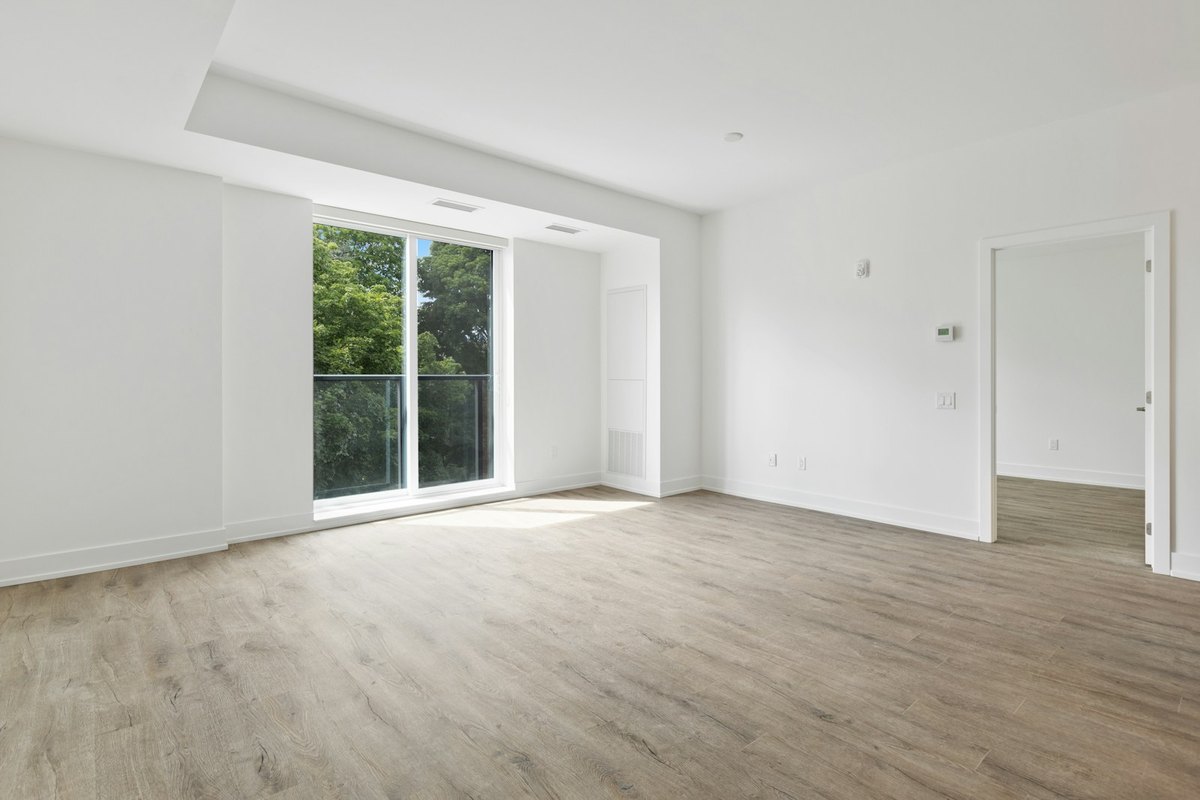
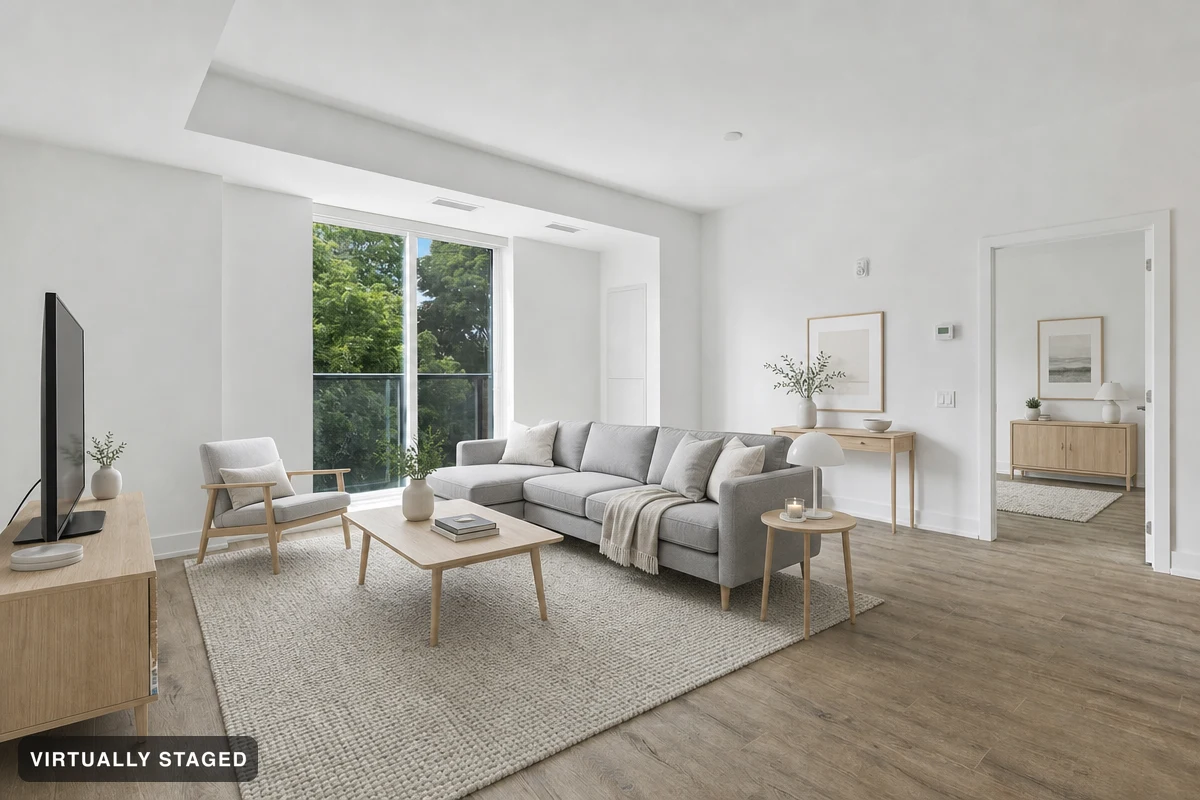 OriginalVirtually staged
A Sedam Staging example from a living room, not a studio: furniture added, and the walls, floor and windows left as photographed. That is the same line to hold in a studio.
Here is what three Canadian rule books say, quoted from the source.
Ontario: PropTx MLS® (TRREB and other boards)
“The following images cannot be included in an MLS® Listing: a) Digitally altered images including the use of any artificial intelligence (“AI”) system or technology to create, alter, or enhance images or digital staging that do not accurately depict the listed real estate;”
PropTx MLS® Rules, Rule 5.01(a), effective December 2, 2024 · read 9 November 2026Alberta: the provincial MLS® rules
“Virtual Staging means adding virtual unattached goods (chattels) of realistic size to property photos in order to give perspective on room dimensions.”
Definition ii“Virtually Enhanced images, or any photos that may misrepresent the property, are not permitted on the Board's MLS® System.”
Rule 2.04(h) · both from the Provincial MLS® System Listing & Practice Rules for Alberta REALTORS®, January 2024 · read 9 November 2026"Of realistic size" matters most in a studio. Furniture shrunk to make the room look roomier gives buyers the wrong idea of its size.
Nova Scotia: NSAR MLS® rules
“Virtual staging is permitted for existing homes. Virtual staging is defined as using photo editing software to create a photo or conceptual rendering of what a room and/or property could look like, if it was staged or lived in. Renderings are required to have the word ‘virtually staged’ prominently displayed on the photo.”
Rule 3.20(a)“Modifying photo(s)/rendering(s) to include visual elements not within a property owner's control is prohibited. Modifications include, but are not limited to: editing in a view that is not physically possible form the specified location in the real world; removing power lines, water towers and or/nearby highways”
Rule 3.20(c), quoted as written, with its two bullet points joined by a semicolon · both from the NSAR MLS® Rules & Regulations, October 9, 2025 · read 9 November 2026Between those two, Rule 3.20(b) allows adding furniture, mirrors, art and plants to a photo of an empty room, and removing existing furniture and replacing it with digital furniture. That second part is the one that helps if you still live in the studio.
Other provinces
British Columbia's regulator, BCFSA, tells agents to label altered photos so buyers are not misled. Quebec's OACIQ asks for a clear statement on AI-changed images. We quote both on our British Columbia and Quebec pages, read 2 September 2026. Every province and territory is on virtual staging rules in Canada.
What we don't know. None of these rule books mentions studios by name, and none says how big digital furniture may be beyond "realistic". Whether swapping your own furniture for digital furniture is allowed outside Nova Scotia is up to your board. Condo buildings can also have their own rules about showings and photos in shared spaces. If you're not sure, leave the edit out and check with your board or a lawyer.
Tell buyers what was edited
Say which photos are virtually staged. In Nova Scotia the words "virtually staged" must be on the photo. In Alberta the listing brokerage must say it in the public remarks (Rule 2.04(g)). Elsewhere, check with your board. A label on the photo plus the original photo beside it is the clearest way to show buyers what was edited.
What Sedam Staging does here, and what it doesn't
- Furnish a photo of your studio. Images made for a listing keep the walls, floor and windows as photographed, carry a "Virtually staged" label and keep your original. Room Check compares the result with your original. It can miss details, so look at both, and check that the furniture looks the right size for the room.
- Take your own furniture out first. If you still live there, Studio can remove loose furniture from the photo before staging it. Check the areas the AI fills in against the original.
- What it can't do: measure your studio, tell you whether a layout fits in real life, or make a listing follow your board's rules. An AI image is not a floor plan. The label and the original photo are how you show buyers what changed.
The first 3 images are free, with no card. See current plans if you need more.
Questions
Where should the bed go when staging a studio?
Against a wall, away from the door if the room allows it, so the first view is the sitting area and the window. Make it neatly and keep a clear path past it. A rug or an open shelf can mark where the bedroom part ends.
Can I virtually stage a studio I still live in?
Often yes. Nova Scotia's MLS rules allow removing existing furniture from a photo and replacing it with digital furniture. The room itself, the view and anything outside the owner's control must stay as they are. Check your own board's rules.
Can virtual staging make a studio look bigger?
It shouldn't. Alberta's rules define virtual staging as adding goods of realistic size to give perspective on room dimensions, and Ontario's PropTx rules ban digital staging that doesn't accurately depict the property. Use furniture that would really fit.
Sources
- PropTx MLS® Rules, effective December 2, 2024, Rule 5.01(a). Read 9 November 2026.
- Provincial MLS® System Listing & Practice Rules for Alberta REALTORS®, January 2024: definition ii, Rules 2.04(g) and (h). Read 9 November 2026.
- NSAR MLS® Rules & Regulations, October 9, 2025, Rule 3.20(a), (b) and (c). Read 9 November 2026.
- BCFSA's Artificial Intelligence Guideline and OACIQ's advertising guideline, as quoted on our British Columbia and Quebec pages. Read 2 September 2026.